


Setting up server racks at home is a way for small companies or remote teams to manage their IT infrastructure. This article discusses the function, advantages, and challenges of using a server rack at home, to provide some tips for you to build a home server rack.
Server Rack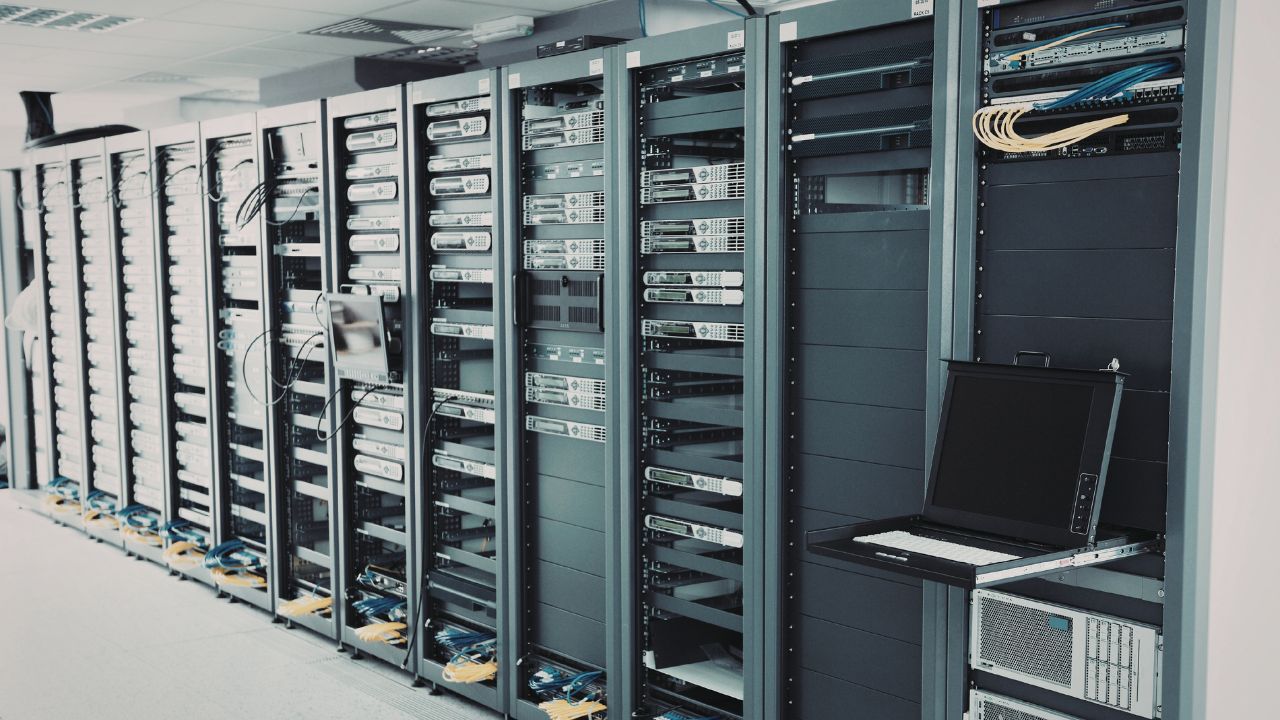
A server rack is a standardized frame or enclosure that is used to house and organize various IT devices. Most server racks follow the 19-inch industry standard. Hardware from different manufacturers can be installed in the same structure.
The server rack is measured in U (rack unit), and 1 U equals 1.75 inches. Rack sizes typically range from 4U to 42U.
What Can a Home Server Rack be Used for?
Building a Home Lab
IT professionals and developers can test with various technologies in a home server rack-based experimental environment. You can implement experiments safely without affecting the production system.
Self-Hosting Services
You can install servers in the rack to host your own applications and services, including private cloud storage, personal websites, game servers, etc. Self-hosting offers greater control, privacy, and customization, but it also has higher costs.
Data Storage
The home server rack can work as a centralized storage repository for your data, including file backups, long-term archival storage, and media libraries. This also elevates data organization and accessibility.
Intelligent Home Systems
The rack can host the server that manages the home automation platform and connects the devices. This enables the entire smart home ecosystem to operate on the local infrastructure.
Advantages of Using a Server Rack at Home
By organizing servers, network devices, and storage devices into a structured system, the home server rack can help you improve efficiency, scalability, and overall infrastructure management.
Centralized Organization and Cable Management
Home server racks can be centrally managed. You can install all the devices in a single rack. This setup makes it easier to manage the wires using patch panels and cable trays. You can also easily recognize and troubleshoot hardware issues and keep a clean and professional infrastructure.
Besides, cable management also improves airflow and reduces the risks of accidental disconnections.
Easier Scalability
Server racks allow you to scale your IT systems over a long period of time. Home server racks have the advantage of modular expansion. You can expand the rack infrastructure in a modularized and predictable manner.
The rack standardization measurement enables you to add equipment at any time without the need to redesign the entire setup. You only need to add additional rack equipment, such as servers, switches, NAS or storage devices.
This makes it more suitable for developing home laboratories, establishing infrastructure for small businesses, and testing environments.
Easier Maintenance and Troubleshooting
Home server racks provide front and back access channels for devices, clearly organized cable paths, and consistent installation locations. As a result, structured systems analysis and design method racks enable more efficient and streamlined procedures when hardware upgrades, network troubleshooting, power management, or storage expansion.
For your home office operation, this can undoubtedly reduce maintenance complexity and guarantee higher runtime and efficiency of operation.
Improved Cooling and Airflow
Heat management is a key factor in keeping a stable IT infrastructure. Servers, storage arrays, and network devices generate an amount of heat when they are operating. Therefore, the server rack is designed with airflow optimization in mind.
Most racks include vents or dedicated airflow paths, fan installations, and more. This helps keep a steady airflow across all installed devices. Good cooling helps to reduce hardware overheating risks and extend the equipment’s lifespan. And it provides a more stable system during high-load operation.
If you use it to run virtual machines, AI workloads, media servers, or data storage systems, good cooling and airflow are vital for reliability.
Cost-Efficiency for Home Lab
Home server racks neatly place all devices in a structured space, which decreases the need for additional furniture. It can simplify the maintenance and upgrade processes. Moreover, it can also save time and reduce the potential downtime. Besides, better airflow and cable management improve hardware reliability, which avoids unnecessary replacement costs.
Higher Security Control
The server rack can provide a physical protection layer for sensitive hardware, preventing the equipment from accidental damage or unauthorized access. Home server racks with lockable front and rear doors, side panels with secure access, and enclosed equipment enclosures.
These can protect your infrastructure from accidental cable removal, physical damage, and unintentional configuration changes.
If you run a small business hybrid work environment, or store important data locally, this additional protection can help you protect your business systems and information.
Professional Infrastructure at a Small Scale
Server racks allow you to replicate enterprise infrastructure practices at home. You can perform standardized device installation and achieve simpler maintenance and hardware replacement, and more efficient infrastructure planning. Your homelab can test software deployments, contact network configurations, and more, which is more valuable to you.
Challenges of Using a Server Rack at Home
Noise Levels
Enterprise-grade servers and networking devices are typically designed for data center environments. Cooling fans produce persistent noise, which is extremely disruptive for residential environments. Therefore, you need to consider carefully when choosing devices. Choosing quieter devices or placing them in basements is also an appropriate solution.
Power Consumption
Server infrastructure consumes more power than conventional electronic products. The rack containing servers, network devices, and storage systems may require continuous power operation, which substantially increases power usage. This substantially increases your electricity bill and requires adding additional power circuits. What’s more, you may also need UPS to provide you with backup power solutions.
Heat Management
Servers and network devices generate quite a bit of heat while they’re running. Home environments using server racks often lack cooling management systems for data centers.
So you can install a rack-mounted fan, or choose a ventilated rack cabinet to guarantee there’s enough space around the rack for airflow. This also helps you keep stable system performance and prevent overheating.
Space Requirements
Standard rack sizes and weights are considerable. If you choose a floor-standing cabinet that can accommodate multiple rack units, it will take up more space. If you have limited space in your home, the rack may face challenges with insufficient installation area, insufficient ventilation space, and limited access space.
Therefore, if space is limited, you can choose wall-mounted units or compact open racks. Smaller rack types are more suitable for residential environments.
Cost
In the long run, the rack is cost-effective. But its initial cost can be your hindrance. Setting up a complete rack requires you to install rails, a power distribution unit, cable management accessories, cooling equipment, and UPS systems. These auxiliary accessories directly increase your initial overall investment.
How to Choose the Proper Server Rack for Your Home?
Choose the Proper Rack Size
Server cabinets are measured in rack units (U), where 1U equals 1.75 inches of vertical space. Choosing the right size requires you to calculate the total number of cabinet units your device needs and reserve space for future expansion.
Most home server racks are 15-22U racks, which perfectly balance rack capacity and space efficiency.
Check Rack Depth Compatibility
The depth of the rack determines whether your hardware can be installed properly. Typically, 24-inch cabinets are suitable for network devices and jumper panels, and 31-39-inch racks are suitable for most rack servers. You can measure your deepest device to determine the depth of the rack and reserve 150-200 mm extra space for cables and airflow.
Select the Right Rack Type
Different environments require different types of racks. Here are some common rack types for home installations:
Wall-Mount Racks: It is suitable for small spaces or apartments. You can use it for networking gear, patch panels, and small servers. The size is usually in 6-12U.
Open-Frame Racks: It has low cost, are easy to install, provide good airflow, and are suitable for basements and garages.
Enclosed Rack Cabinets: They can provide better protection and security, reduce dust exposure, and are equipped with lockable doors and good cable management.
Consider Weight Capacity
Select a rack with the appropriate load capacity based on the total weight of your equipment. You need to calculate the weights of all servers, UPS units and network devices, and verify that the total weight is within 50% to 60% of the maximum load capacity of the rack.
Choose the Cooling Types
Depending on your device‘s cooling needs, you can consider features such as ventilation with perforated holes or mesh doors, built-in fan mounting options, and sufficient spacing for front-to-back airflow. These can prevent your device from overheating and make sure that your rack equipment operates reliably.
Evaluate the Space
Evaluating the available space in your home is a prerequisite for successful installation. You need to consider the floor space required for installation, ceiling height, clear space in the maintenance passage, and how close the devices are connected. Placing compact racks in closets and storage rooms is also a practical solution.
FAQ
Can I Build a Home Server Rack by Myself?
Yes. You can build your own home server rack yourself. This can reduce costs and allow customization for your home laboratory space. However, you need to carefully plan your construction to guarantee weight support, 19-inch installation compatibility, cable management, and sufficient airflow for cooling.
For small Home server racks, DIY is a cost-effective and flexible solution. However, for heavier servers or long-term infrastructure use, using professionally manufactured racks is a better choice.
Do I Need a Cooling System for a Home Server Rack?
This isn‘t always the case. If your device only has low-power devices, such as small servers, switches, or NAS, natural ventilation and well-ventilated racks are sufficient. If your rack contains multiple servers or high-performance devices, you need additional cooling devices to keep the system running steadily.
Is a UPS Needed for the Home Server Rack?
Uninterrupted Power Supply (UPS) is recommended but strictly required. UPS provides backup power during short power outages and protects devices from electrical surges or voltage fluctuations. It can ensure a secure shutdown of servers and storage devices, thereby reducing the risk of data loss or hardware damage.
If you are running a server, NAS system, or home lab for important services, UPS can help you improve system reliability and power protection.
Final Thought
KDM, as a professional electrical enclosure manufacturer, can provide you with home server racks. We can also customize the server rack for your home application. We use advanced production processes and high-quality raw materials to provide you with high-quality products. Contact us now for your customized solution.
 English
  Arabic
  French
  Spanish
  Russian
  Japanese
  Korean
  Portuguese
  Indonesian
  Chinese